
Last updated on
Oct 19, 2026

Get the free Duplicate Certificate of Registration Application
We are not affiliated with any brand or entity on this form

Fill out
Complete the form online in a simple drag-and-drop editor.

eSign
Add your legally binding signature or send the form for signing.

Share
Share the form via a link, letting anyone fill it out from any device.

Export
Download, print, email, or move the form to your cloud storage.
Why pdfFiller is the best tool for your documents and forms


End-to-end document management
From editing and signing to collaboration and tracking, pdfFiller has everything you need to get your documents done quickly and efficiently.
Accessible from anywhere
pdfFiller is fully cloud-based. This means you can edit, sign, and share documents from anywhere using your computer, smartphone, or tablet.
Secure and compliant
pdfFiller lets you securely manage documents following global laws like ESIGN, CCPA, and GDPR. It's also HIPAA and SOC 2 compliant.
What is Duplicate Registration App
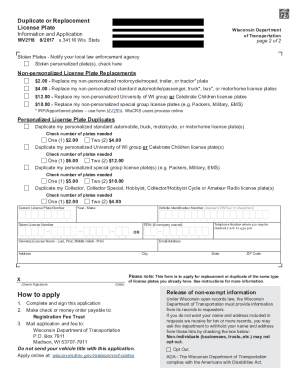
The Duplicate Certificate of Registration Application is a government form used by Wisconsin residents to request a replacement vehicle registration certificate.
pdfFiller scores top ratings on review platforms




Who needs Duplicate Registration App?
Explore how professionals across industries use pdfFiller.

Duplicate Registration App is needed by:
-
Vehicle owners in Wisconsin needing a duplicate registration.
-
Lessees requiring replacement of vehicle registration certificates.
-
Individuals who recently lost or damaged their vehicle registration.
-
Residents who need to update their contact information on vehicle registrations.
-
Individuals who want to ensure legal compliance for vehicle registration documentation.
Comprehensive Guide to Duplicate Registration App
What is the Duplicate Certificate of Registration Application?
The Duplicate Certificate of Registration Application is a vital form used in Wisconsin to request a replacement vehicle registration certificate. Understanding the purpose of this application is essential for vehicle owners and lessees who need to verify their vehicle's registration status. This form is particularly important when you have lost or misplaced your original registration. The process allows for various types of vehicles, ensuring that all owners can maintain valid documentation.
The importance of obtaining a Duplicate Certificate of Registration cannot be understated. Without this certificate, vehicle ownership verification can become problematic, especially during transactions like selling or transferring a vehicle.
Why You Need the Duplicate Certificate of Registration Application
The need for a Duplicate Certificate arises in several scenarios, such as loss or theft of the original document. Requesting a duplicate ensures that you can continue to prove ownership of your vehicle legally. Additionally, having this certificate is crucial for vehicle ownership verification, which may be required in various situations, including insurance claims or legal matters.
Not possessing a valid certificate of registration can result in penalties or legal complications, highlighting the significance of promptly addressing any need for a duplicate.
Who Should File the Duplicate Certificate of Registration Application?
This application is intended for individuals who are vehicle owners or lessees in Wisconsin. Anyone in these categories may find themselves needing to file for a duplicate certificate in circumstances such as the loss or theft of the original document.
-
Vehicle owners who have lost their registration certificate.
-
Lessees whose lease agreements require proof of registration.
Specific qualifications, such as providing accurate vehicle identification information, are essential to the application process.
How to Fill Out the Duplicate Certificate of Registration Application Online
To successfully complete the Duplicate Certificate of Registration Application online, follow these step-by-step instructions:
-
Access the application form through an official platform.
-
Enter your license plate number in the designated field.
-
Provide your owner's information, including last name, first name, and middle initial.
-
Fill in your contact information, including telephone number and email address.
Ensure each field is completed accurately to avoid common mistakes that may delay processing.
Required Documents and Information for Your Application
When applying for a Duplicate Certificate of Registration, it is crucial to have all necessary information and documents ready. Essential details include:
-
Vehicle Identification Number (VIN).
-
Your address and contact information.
Additionally, supporting documents that verify ownership or identity should be included to enhance the efficiency of your application process.
Submission Methods and Fees for the Duplicate Certificate of Registration Application
Once your application is completed, it must be submitted to the Wisconsin Department of Transportation. You can send the form via mail along with a processing fee of $2.00. Accepted payment methods include checks or money orders made out to the Department of Transportation.
Be aware that there is a timeline for processing your application, typically ranging from a few days to a couple of weeks, depending on the volume of requests.
What to Do After Submitting Your Application
After submitting your application, it is essential to confirm that it has been received. You can often track the status of your application online or by contacting the department directly. Prepare to address any potential issues or rejections promptly to avoid further delays.
-
Check for confirmation via email or mail.
-
Contact the department for tracking updates.
Once processed, you will receive your duplicate certificate which serves as proof of valid registration.
Leveraging pdfFiller for Your Duplicate Certificate of Registration Application
pdfFiller simplifies the process of filling out the Duplicate Certificate of Registration Application. Its user-friendly platform enables you to enter your details quickly and securely. This tool is equipped with features that enhance document management, ensuring your sensitive information is protected with 256-bit encryption and compliance with regulations like HIPAA and GDPR.
By choosing pdfFiller, you can enjoy streamlined document handling while focusing on completing your application efficiently.
Common Errors to Avoid When Filing Your Duplicate Certificate of Registration Application
Avoiding common mistakes during the application process is critical for timely approval. Frequent errors include:
-
Inaccurate or incomplete information in the application fields.
-
Failing to include necessary supporting documents.
It is advisable to double-check all provided information and refer to available resources for assistance or clarification.
Your Path to a Successful Duplicate Certificate of Registration Application
Completing the Duplicate Certificate of Registration Application successfully is essential for ensuring legal proof of vehicle ownership. Utilizing tools like pdfFiller can enhance your experience, making the process smooth and efficient. Start by gathering necessary documents and be proactive in filling out your application.
How to fill out the Duplicate Registration App
-
1.Access the form on pdfFiller by searching for 'Duplicate Certificate of Registration Application' in the template library.
-
2.Open the selected form by clicking on it to launch the pdfFiller interface, allowing you to edit and complete the document.
-
3.Before you begin filling out the form, gather necessary information such as your current license plate number, vehicle identification number (VIN), and personal contact details.
-
4.Use the fillable fields to enter your current license plate number, last name, first name, and middle initial accurately.
-
5.Fill in your driver license number, street address, city, state, ZIP code, area code, and telephone number in their respective sections.
-
6.Ensure that your email address is entered correctly to facilitate communication regarding your submission.
-
7.Once the form is completed, review all entered information for accuracy, ensuring there are no typos or missing details.
-
8.Finalize your form by saving it within pdfFiller or downloading it to your device for further processing.
-
9.Submit the completed form along with a $2.00 fee to the Wisconsin Department of Transportation, either by mailing it to the appropriate address or utilizing any provided electronic submission options.

Who is eligible to use the Duplicate Certificate of Registration Application?
Wisconsin residents who own or lease a vehicle and require a replacement registration certificate due to loss or damage are eligible to use this form.
What are the fees associated with submitting this application?
The application requires a payment of $2.00, which must be included when mailing the completed form to the Wisconsin Department of Transportation.
How should I submit the completed application?
You must mail the completed form along with the payment to the Wisconsin Department of Transportation as indicated on the form.
What information do I need to provide in the application?
You need to provide details including the license plate number, vehicle identification number, and personal contact information, including your name and address.
What should I do if I filled out the form incorrectly?
If errors are detected after submission, contact the Wisconsin Department of Transportation for guidance on correcting your application or consider reapplying.
How long does it take to process my application?
Processing times can vary, but it typically takes a few weeks to receive your duplicate certificate after the application has been submitted.
Can I complete the form online?
While you can complete the form using pdfFiller, the final submission must be mailed to the appropriate department, as online submission options may not be available.
Related Content
Related Forms



Get the latest insights from our blog


If you believe that this page should be taken down, please follow our DMCA take down process
here
.
This form may include fields for payment information. Data entered in these fields is not covered by PCI DSS compliance.